
Hey there!
I'm fiiiiiiiiiiiinally getting a chance to link up with my sweet friend Holly for

**Updated 3/15/14- So, it appears you only get 18 free newsletters and then you have to pay to use the site. Super sad face. I went in to make a new newsletter and it gave me a message I had used up all my free newsletter. Grrrrrr.**
A few weeks ago a wonderful teacher that I work with showed me an amazing online tool for my weekly newsletters to parents. I don't know about you, but we are required to send parents a newsletter at least once a week electronically so they know what we are doing each week.
I was creating my newsletter in powerpoint and then sending it as a PDF each week. Which was totally fine, except it was filling up my school email because I always kept record of what I was sending.
So, when she showed me this easy and FREE online site for making my newsletter, I was intrigued. So, of course, I played with it and figured out that I really really like it!! (**Disclaimer- these are my opinions and I was not asked to give a review about this site. I just like it!**)
So, I'm going to show you how you can also use this site!! Here is a link to one of my newsletters so you can see what the end product can look like. I haven't inserted any cute pictures or images to title the different sections yet, but you can totally do that!
Now, don't get freaked out by all the screen shots below. It looks like it's a lot, but I promise it's not that bad! The most time you will put into it is the very first time you set up your newsletter. After that, you can DUPLICATE it and just change what you wrote, like a normal newsletter. All of the titles and everything will be right there! But honestly, it takes me no time at all now to fill in what we are doing. Since I'm not having to reformat each time I add or change things in my powerpoint, it really only takes me 5-10 minutes each week to make changes and email it to the parents!
Okay, onto how to do it (and remember, these screenshots take you step by step!!)!
The site is www.smore.com.
You'll have to sign up and create an account first. This is an online tool. They call them flyers, but it works great for newsletters!


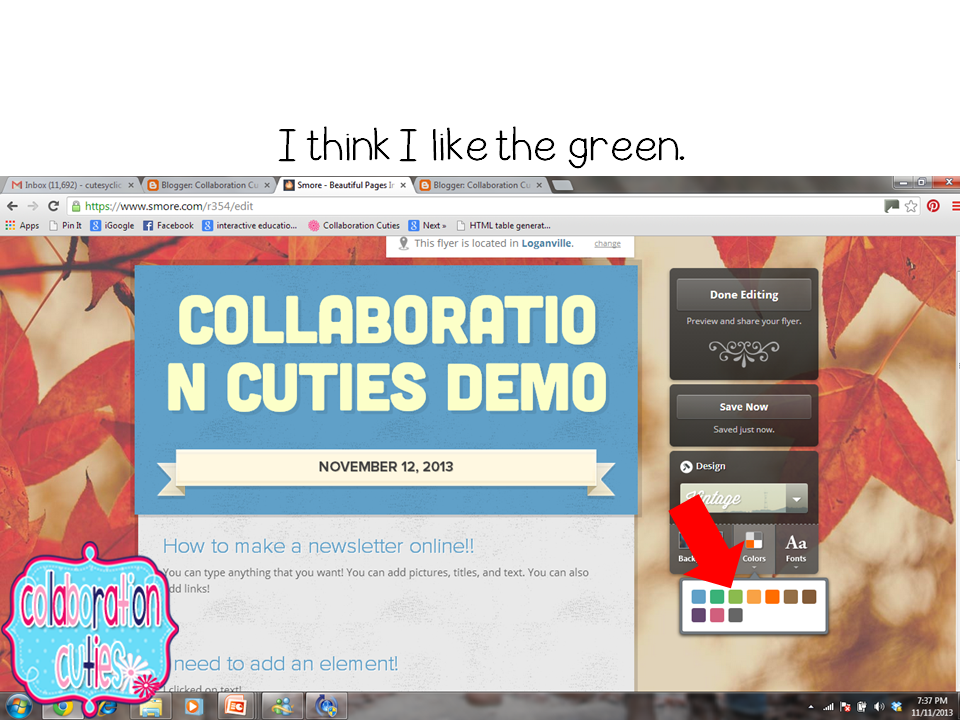


Phew! That was a lot of screenshots!! I know it looks like a lot, but if you are willing to, I bet if you play with it, you'll figure it out!! If you have any burning questions, feel free to comment and leave your email and I will try to answer them! I'm pretty new at it myself!
I did ask the parents for feedback about this, and they seem to like it. There is a print option if you have students that don't have a computer, but I don't have that issue this year. Most can access it from their phone or computer.
I really like it because I can type as much as I want, without having to worry about fitting it on a page. I tried to get my newsletter on one side of a page, but that left me very limited to how much I could type. I was putting a lot in the body of my emails and then they were still having to open the PDF of the newsletter and read that as well.
Anywho, this is just another option for you, in case you wanted to try something new!
Be sure to check out the other ideas linked up to Tried It Tuesday!!
Have a great week!
Amanda


